ref:https://blog.wax-o.com/2015/05/an-alternative-to-if-else-and-switch-in-javascript/
var result = ( ( {
45: () => {
return 11;
},
11: () => {
return 45;
},
} )[ 11 ])();
call(), apply(), and bind() methods of JavaScript functions with simple examples. As functions are also Objects in JavaScript, these 3 methods are used to control the invocation of the function. call() and apply() were introduced in ECMAScript 3 while bind() was added as part of ECMAScript 5.call()/apply() to invoke the function immediately. bind() returns a bound function that, when executed later, will have the correct context ("this") for calling the original function. So bind() can be used when the function needs to be called later in certain events when it's useful.call() or Function.prototype.call()call()//Demo with javascript .call()
var obj = {name:"Niladri"};
var greeting = function(a,b,c){
return "welcome "+this.name+" to "+a+" "+b+" in "+c;
};
console.log(greeting.call(obj,"Newtown","KOLKATA","WB"));
// returns output as welcome Niladri to Newtown KOLKATA in WB
call() method sets the "this" value, which is the object, on which the function is invoked upon. In this case, it's the "obj" object above.apply() or Function.prototype.apply()apply()//Demo with javascript .apply()
var obj = {name:"Niladri"};
var greeting = function(a,b,c){
return "welcome "+this.name+" to "+a+" "+b+" in "+c;
};
// array of arguments to the actual function
var args = ["Newtown","KOLKATA","WB"];
console.log("Output using .apply() below ")
console.log(greeting.apply(obj,args));
/* The output will be
Output using .apply() below
welcome Niladri to Newtown KOLKATA in WB */
call() method the first parameter in apply() method sets the "this"value which is the object upon which the function is invoked. In this case it's the "obj" object above. The only difference of apply() with the call() method is that the second parameter of the apply() method accepts the arguments to the actual function as an array.bind() or Function.prototype.bind()bind()//Use .bind() javascript
var obj = {name:"Niladri"};
var greeting = function(a,b,c){
return "welcome "+this.name+" to "+a+" "+b+" in "+c;
};
//creates a bound function that has same body and parameters
var bound = greeting.bind(obj);
console.dir(bound); ///returns a function
console.log("Output using .bind() below ");
console.log(bound("Newtown","KOLKATA","WB")); //call the bound function
/* the output will be
Output using .bind() below
welcome Niladri to Newtown KOLKATA in WB */
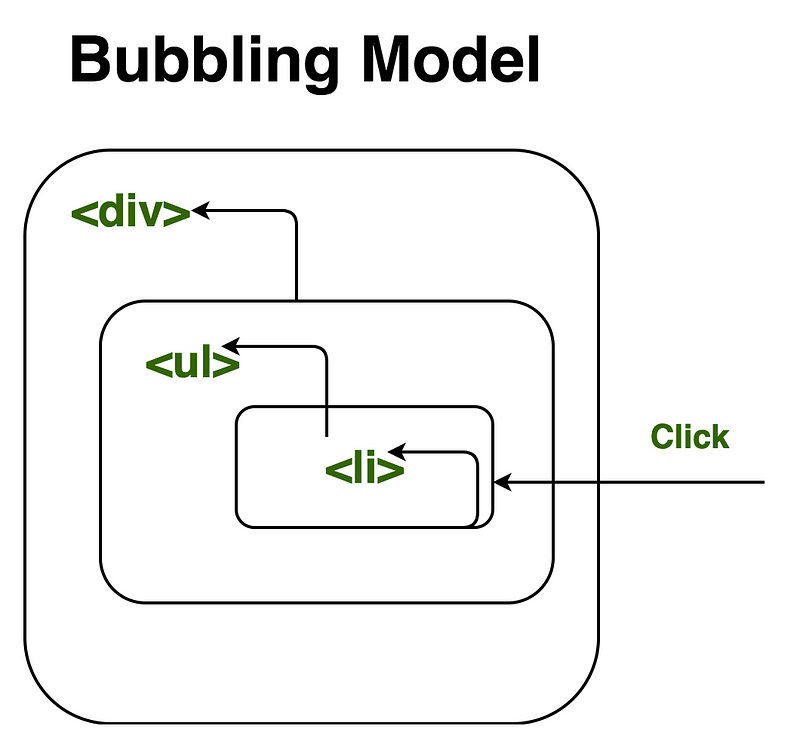
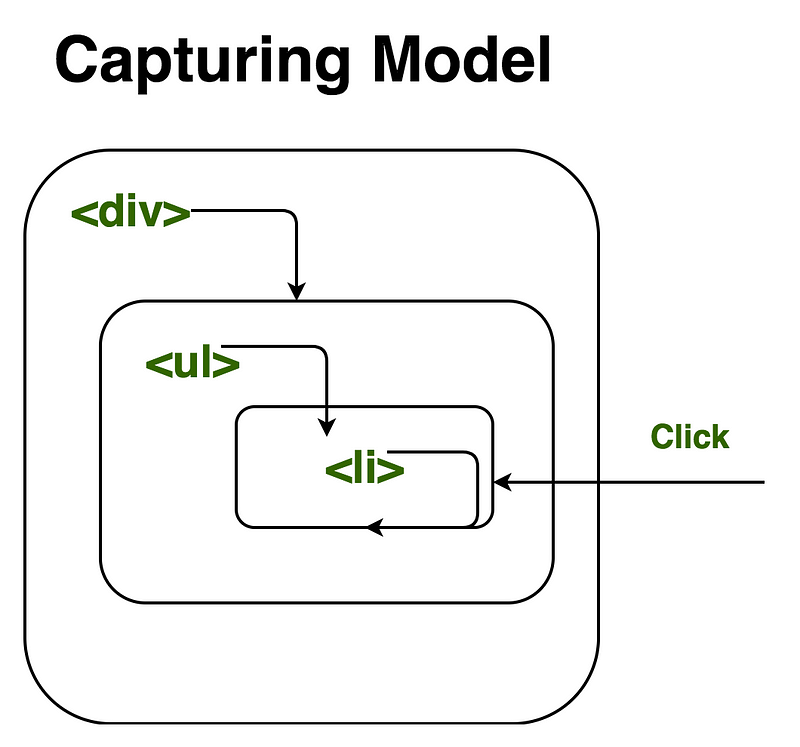
bind() we are returning a bound function with the context which will be invoked later. We can see the bound function in the console as below .apply(), call(), and bind()methods of JavaScript.“Event bubbling and capturing are two ways of event propagation in the HTML DOM API when an event occurs in an element inside another element, and both elements have registered a handler for that event. The event propagation mode determines in which order the elements receive the event.”
addEventListener("click", handler, useCapture=false)
<div onClick="divHandler()">
    <ul onClick="ulHandler">
        <li id="foo"></li>
    </ul>
</div>
<script>
function handler() {
// do something here
}
function divHandler(){}
function ulHandler(){}
document.getElementById("foo").addEventListener("click", handler)
</script>
document.getElementById("foo").addEventListener("click", handler, true)
undefined and not defined in JavaScriptvar name is not defined and the script will stop execute thereafter. But If you use typeof undeclared_variable then it will return undefined.var x is a declaration because you are not defining what value it holds yet, but you are declaring its existence and the need for memory allocation.var x; // declaring x
console.log(x); //output: undefined
var x = 1 is both declaration and definition (also we can say we are doing initialisation), Here declaration and assignment of value happen inline for variable x, In JavaScript every variable declaration and function declaration brings to the top of its current scope in which it's declared then assignment happen in order this term is called hoisting.undefined.var x; // Declaration
if(typeof x === 'undefined') // Will return true
not defined.console.log(y); // Output: ReferenceError: y is not defined
var y = 1;
if (function f() {}) {
  y += typeof f;
}
console.log(y);
1undefined. inside if statement we have function f(){}. Here's it's a function expression, not function statement, which is why f is not a variable.var myFunc1 = new function() {}
var myFunc2 = new function whatever() {} // whatever is not a variable here
function myFunc3() {}
var Employee = function (name, company, salary) {
  this.name = name || "";
  this.company = company || "";
  this.salary = salary || 5000;

  // Private method
  var increaseSalary = function () {
    this.salary = this.salary + 1000;
  };

};

// adding the method to Employee's prototype
Employee.prototype.displayIncreasedSalary = function() {
  increaseSalary();
  console.log(this.salary);
};

// Creating three Employee objects
var emp1 = new Employee("John","Pluto",3000);
var emp2 = new Employee("Merry","Pluto",2000);
var emp3 = new Employee("Ren","Pluto",2500);
emp1, emp2, emp3 has own copy of increaseSalary private method. However the displayIncreasedSalary will only be added once to an object Employee.prototype.var globalVar = "abc";
// Parent self invoking function
(function outerFunction (outerArg) { // begin of scope outerFunction
// Variable declared in outerFunction function scope
var outerFuncVar = 'x';
// Closure self-invoking function
(function innerFunction (innerArg) { // begin of scope innerFunction
// variable declared in innerFunction function scope
var innerFuncVar = "y";
console.log(
"outerArg = " + outerArg + "\n" +
"outerFuncVar = " + outerFuncVar + "\n" +
"innerArg = " + innerArg + "\n" +
"innerFuncVar = " + innerFuncVar + "\n" +
"globalVar = " + globalVar);
// end of scope innerFunction
})(5); // Pass 5 as parameter
// end of scope outerFunction
})(7); // Pass 7 as parameter
innerFunction is closure which is defined inside outerFunction and has access to all variable which is declared and defined in outerFunction scope. In addition to this function defined inside the function as closure has access to the variable which is declared in global namespace.outerArg = 7
outerFuncVar = x
innerArg = 5
innerFuncVar = y
globalVar = abc
console.log(mul(2)(3)(4)); // output : 24
console.log(mul(4)(3)(4)); // output : 48
function mul (x) {
  return function (y) { // anonymous function
    return function (z) { // anonymous function
      return x * y * z;
    };
  };
}
mul function accepts the first argument and returns the anonymous function which takes the second parameter and returns the anonymous function which takes the third parameter and returns the multiplication of arguments which is being passed in successivevar arrayList = ['a', 'b', 'c', 'd', 'e', 'f'];
arrayList = [];
arrayList to a new empty array. This is recommended if you don't have references to the original array arrayList anywhere else because It will actually create a new empty array. You should be careful with this way of empty the array, because if you have referenced this array from another variable, then the original reference array will remain unchanged, Only use this way if you have only referenced the array by its original variable arrayList.var arrayList = ['a', 'b', 'c', 'd', 'e', 'f']; // Created array
var anotherArrayList = arrayList; // Referenced arrayList by another variable
arrayList = []; // Empty the array
console.log(anotherArrayList); // Output ['a', 'b', 'c', 'd', 'e', 'f']
arrayList.length = 0;
var arrayList = ['a', 'b', 'c', 'd', 'e', 'f']; // Created array
var anotherArrayList = arrayList;  // Referenced arrayList by another variable
arrayList.length = 0; // Empty the array by setting length to 0
console.log(anotherArrayList); // Output []
arrayList.splice(0, arrayList.length);
var arrayList = ['a', 'b', 'c', 'd', 'e', 'f']; // Created array
var anotherArrayList = arrayList;  // Referenced arrayList by another variable
arrayList.splice(0, arrayList.length); // Empty the array by setting length to 0
console.log(anotherArrayList); // Output []
while(arrayList.length) {
  arrayList.pop();
}
toString method from Object.prototypevar arrayList = [1 , 2, 3];
greet which can take a single string and also a list of strings. To make our greet method workable in both situation we need to know what kind of parameter is being passed: is it single value or list of values?function greet(param) {
if() {
// here have to check whether param is array or not
}
else {
}
}
 function greet(param) {
   if(typeof param === 'string') {
   }
   else {
     // If param is of type array then this block of code would execute
   }
 }
single value, array, and object type then we will be in trouble.Object.prototype.toStringif(Object.prototype.toString.call(arrayList) === '[object Array]') {
console.log('Array!');
}
jQuery then you can also used jQuery isArray method:if($.isArray(arrayList)) {
console.log('Array');
} else {
console.log('Not an array');
}
Object.prototype.toString.call internally to check whether an object is an array or not.Array.isArray(arrayList);
Array.isArray is supported by Chrome 5, Firefox 4.0, IE 9, Opera 10.5 and Safari 5var output = (function(x) {
delete x;
return x;
})(0);
console.log(output);
0 as output. delete operator is used to delete a property from an object. Here x is not an object it's local variable. delete operator doesn't affect local variables.var x = 1;
var output = (function() {
delete x;
return x;
})();
console.log(output);
1 as output. delete operator is used to delete a property from an object. Here x is not an object it's global variable of type number.var x = { foo : 1};
var output = (function() {
delete x.foo;
return x.foo;
})();
console.log(output);
undefined as output. delete operator is used to delete a property from an object. Here x is an object which has foo as a property and from a self-invoking function, we are deleting the foo property of object x and after deletion, we are trying to reference deleted property foo which result undefined.var Employee = {
company: 'xyz'
}
var emp1 = Object.create(Employee);
delete emp1.company
console.log(emp1.company);
xyz as output. Here emp1 object got company as prototype property. delete operator doesn't delete prototype property.emp1 object doesn't have company as its own property. you can test it console.log(emp1.hasOwnProperty('company')); //output : false However, we can delete company property directly from Employee object using delete Employee.companyor we can also delete from emp1 object using __proto__ property delete emp1.__proto__.company.undefined x 1 in JavaScriptvar trees = ["redwood", "bay", "cedar", "oak", "maple"];
delete trees[3];
console.log(trees); in chrome developer console then you will get ["redwood", "bay", "cedar", undefined × 1, "maple"].empty of undefined x 1.["redwood", "bay", "cedar", undefined, "maple"]trees[3] === undefined in any browser you will get similar output as true.trees[3] === 'undefined × 1' it will give an error because 'undefined × 1' this is just way of displaying an uninitialized index of an array in chrome.var trees = ["xyz", "xxxx", "test", "ryan", "apple"];
delete trees[3];
console.log(trees.length);
5 as output. When we used delete operator for deleting an array element then, the array length is not affected by this. This holds even if you deleted all elements of an array using delete operator.undefined x 1 in chrome and undefined is placed at the index. If you do console.log(trees) output ["xyz", "xxxx", "test", undefined × 1, "apple"] in Chrome and in Firefox ["xyz", "xxxx", "test", undefined, "apple"].var bar = true;
console.log(bar + 0);
console.log(bar + "xyz");
console.log(bar + true);
console.log(bar + false);
1, "truexyz", 2, 1 as output. Here's a general guideline for the plus operator:var z = 1, y = z = typeof y;
console.log(y);
"undefined" as output. According to associativity rule operator with the same precedence are processed based on their associativity property of operator. Here associativity of the assignment operator is Right to Left so first typeof y will evaluate first which is string "undefined" and assigned to z and then y would be assigned the value of z. The overall sequence will look like that:var z;
z = 1;
var y;
z = typeof y;
y = z;
// NFE (Named Function Expression)
var foo = function bar() { return 12; };
typeof bar();
Reference Error. To fix the bug we can try to rewrite the code a little bit:var bar = function() { return 12; };
typeof bar();
function bar() { return 12; };
typeof bar();
bar is reference variable which is pointing to anonymous function and in sample 2 we have function statement and bar is the function name.var foo = function bar() {
// foo is visible here
// bar is visible here
console.log(typeof bar()); // Works here :)
};
// foo is visible here
// bar is undefined here
var foo = function() {
  // Some code
};
function bar () {
  // Some code
};
foo is defined at run-time and is called function expression, whereas function bar is defined at parse time and is called function statement. To understand in better, let's see below code :// Run-Time function declaration
<script>
foo(); // Call foo function here, It will give an error
var foo = function() {
console.log("Hi I am inside Foo");
};
</script>
// Parse-Time function declaration
<script>
bar(); // Call bar function here, It will not give an Error
function bar() {
  console.log("Hi I am inside Foo");
};
</script>
<script>
if(testCondition) { // If testCondition is true then
  function foo() {
    console.log("inside Foo with testCondition True value");
  };
 } else {
  function foo() {
    console.log("inside Foo with testCondition false value");
  };
 }
 </script>
<script>
if (testCondition) {
   var foo = function() {
      console.log("inside Foo with testCondition True value");
   };
 } else {
    var foo = function() {
      console.log("inside Foo with testCondition false value");
   };
 }
 </script>
 var foo = function foo() {
     return 12;
 };
var-declared variables and functions are hoisted. Let's take function hoisting first. Basically, the JavaScript interpreter looks ahead to find all the variable declaration and hoists them to the top of the function where it's declared. For Example:foo(); // Here foo is still undefined
var foo = function foo() {
return 12;
};
var foo = undefined;
foo(); // Here foo is undefined
foo = function foo() {
  // Some code stuff
}
var foo = undefined;
foo = function foo() {
  // Some code stuff
}
foo(); // Now foo is defined here
var salary = "1000$";

(function () {
  console.log("Original salary was " + salary);

  var salary = "5000$";

  console.log("My New Salary " + salary);
})();
undefined, 5000$ because of hoisting. In the code presented above, you might be expecting salary to retain it values from outer scope until the point that salary was re-declared in the inner scope. But due to hoisting salary value was undefined instead. To understand it better have a look of the following code, here salaryvariable is hoisted and declared at the top in function scope. When we print its value using console.log the result is undefined. Afterwards the variable is redeclared and the new value "5000$" is assigned to it.var salary = "1000$";
(function () {
var salary = undefined;
console.log("Original salary was " + salary);
salary = "5000$";
console.log("My New Salary " + salary);
})();
typeof and instanceof?typeof is an operator that returns a string with the type of whatever you pass.typeof operator checks if a value belongs to one of the six basic types: number, string, boolean, object, functionor undefined.typeof(null) will return object.instanceof is much more intelligent: it works on the level of prototypes. In particular, it tests to see if the right operand appears anywhere in the prototype chain of the left. instanceof doesn’t work with primitive types. It instanceof operator checks the current object and returns true if the object is of the specified type, for example:var dog = new Animal();
dog instanceof Animal; // Output : true
dog instanceof Animal is true since dog inherits from Animal.prototypevar name = new String("xyz");
name instanceof String; // Output : true
var counterArray = {
  A : 3,
  B : 4
};
counterArray["C"] = 1;
Object has keys method which can we used to calculate the length of object.Object.keys(counterArray).length; // Output 3
function getLength(object) {
  var count = 0;
  for(key in object) {
    // hasOwnProperty method check own property of object
    if(object.hasOwnProperty(key)) count++;
  }
  return count;
}
getOwnPropertyNames method, so we can calculate the length using the following code:Object.getOwnPropertyNames(counterArray).length; // Output 3
size dedicated to calculate the object length. We don't recommend to include one of these libraries just to use the size method, but if it's already used in your project - why not?_.size({one: 1, two: 2, three: 3});
=> 3
Function, Method and Constructor calls in JavaScript.function helloWorld(name) {
return "hello world, " + name;
}
helloWorld("JS Geeks"); // "hello world JS Geeks"
var obj = {
  helloWorld : function() {
    return "hello world, " + this.name;
  },
  name: 'John Carter'
}
obj.helloWorld(); // // "hello world John Carter"
helloWorld refer to this properties of obj. Here it's clear or you might have already understood that this gets bound to obj. But the interesting point that we can copy a reference to the same function helloWorld in another object and get a difference answer. Let see:var obj2 = {
helloWorld : obj.helloWorld,
name: 'John Doe'
}
obj2.helloWorld(); // "hello world John Doe"
this, The expression obj2.helloWorld() looks up the helloWorld property of obj and calls it with receiver object obj2.constructors are defined with function.function Employee(name, age) {
this.name = name;
this.age = age;
}
var emp1 = new Employee('John Doe', 28);
emp1.name; // "John Doe"
emp1.age; // 28
new Employee('John Doe', 28) creates a brand new object and passes it as the value of this, and implicitly returns the new object as its result.function User(name) {
this.name = name || "JsGeeks";
}
var person = new User("xyz")["location"] = "USA";
console.log(person);
"USA". Here new User("xyz") creates a brand new object and created property location on that and USA has been assigned to object property location and that has been referenced by the person.new User("xyz") created a object called foo. The value "USA" will be assigned to foo["location"], but according to ECMAScript Specification , pt 12.14.4 the assignment will itself return the rightmost value: in our case it's "USA". Then it will be assigned to person.function User(name) {
this.name = name || "JsGeeks";
}
var person;
var foo = User("xyz");
foo["location"] = "USA";
// the console will show you that the result of this is "USA"
// Function statement
function myFunc() {
  // Do some stuff;
}

// Calling the function
myFunc();
// Anonymous Self-invoking Function
(function() {
  // Do some stuff;
})();
const myFunc (arg) => {
    console.log("hello", arg)
}
obj1.myMethod(), the reference to obj1 gets assigned (bound) to this variable. In other words, the value of this will be obj1 inside myMethod.var obj1 = {
attribute: "xyz",
myMethod: function () { // Method
console.log(this.attribute);
}
};
// Call the method
obj1.display();
obj1 is an object and myMethod is a method which is associated with obj1.class MyAwesomeClass {
myMethod() {
console.log("hi there");
}
}
const obj1 = new MyAwesomeClass();
obj1.myMethod();
var obj1 = {
    prop1: "buddy"
};
var myFunc = function () {
    console.log("Hi there", this);
};
// let's call myFunc as a function:
myFunc(); // will output "Hi there undefined" or "Hi there Window"

obj1.myMethod = myFunc;
//now we're calling myFunc as a method of obj1, so this will point to obj1
obj1.myMethod(); // will print "Hi there" following with obj1.
(function() {
  console.log("Hi, I'm IIFE!");
})();
// outputs "Hi, I'm IIFE!"
function a () {}) and function expressions (var a = function() {})? So, IIFE is a function expression. To make it an expression we surround our function declaration into the parens. We do it to explicitly tell the parser that it's an expression, not a statement (JS doesn't allow statements in parens).() braces, this is how we run the function we just declared.(function myIIFEFunc() {
console.log("Hi, I'm IIFE!");
})();
// outputs "Hi, I'm IIFE!"
(function myIIFEFunc(param1) {
  console.log("Hi, I'm IIFE, " + param1);
})("Yuri");
// outputs "Hi, I'm IIFE, Yuri!"
"Yuri" is passed to the param1 of the function.var result = (function myIIFEFunc(param1) {
console.log("Hi, I'm IIFE, " + param1);
return 1;
})("Yuri");
// outputs "Hi, I'm IIFE, Yuri!"
// result variable will contain 1
~function(){console.log("hi I'm IIFE")}()!function(){console.log("hi I'm IIFE")}()+function(){console.log("hi I'm IIFE")}()-function(){console.log("hi I'm IIFE")}()(function(){console.log("hi I'm IIFE")}());var i = function(){console.log("hi I'm IIFE")}();true && function(){ console.log("hi I'm IIFE") }();0, function(){ console.log("hi I'm IIFE") }();new function(){ console.log("hi I'm IIFE") }new function(){ console.log("hi I'm IIFE") }()It is an object that is used to create namespace and group together a related set of methods and attributes (encapsulation) and if we allow to initiate then it can be initiated only once.
function findUserName(id) {

}

/* Later in the page another programmer
added code */
var findUserName = $('#user_list');

/* You are trying to call :( */
console.log(findUserName())
/*  Using Namespace */

var MyNameSpace = {
  findUserName : function(id) {},
  // Other methods and attribute go here as well
}

/* Later in the page another programmer
added code */
var findUserName = $('#user_list');

/* You are trying to call and you make this time workable */
console.log(MyNameSpace.findUserName());
/* Lazy Instantiation skeleton for a singleton pattern */

var MyNameSpace = {};
MyNameSpace.Singleton = (function() {

  // Private attribute that holds the single instance
  var singletonInstance;

  // All of the normal code goes here
  function constructor() {
    // Private members
    var privateVar1 = "Nishant";
    var privateVar2 = [1,2,3,4,5];

    function privateMethod1() {
      // code stuff
    }

    function privateMethod1() {
      // code stuff
    }

    return {
      attribute1 : "Nishant",
      publicMethod: function() {
        alert("Nishant");// some code logic
      }
    }
  }

  return {
    // public method (Global access point to Singleton object)
    getInstance: function() {
      //instance already exist then return
      if(!singletonInstance) {
        singletonInstance = constructor();
      }
      return singletonInstance;
    }
  }

})();

// getting access of publicMethod
console.log(MyNamespace.Singleton.getInstance().publicMethod());
Employeeand used it as a constructor by calling it with the new operator. function Employee(fName, lName, age, salary){
this.firstName = fName;
this.lastName = lName;
this.age = age;
this.salary = salary;
}
// Creating multiple object which have similar property but diff value assigned to object property.
var employee1 = new Employee('John', 'Moto', 24, '5000$');
var employee1 = new Employee('Ryan', 'Jor', 26, '3000$');
var employee1 = new Employee('Andre', 'Salt', 26, '4000$');
var employee = {
 name : 'Nishant',
 salary : 245678,
 getName : function(){
  return this.name;
 }
}
var employee = {
 name : 'Nishant',
 salary : 245678,
 address : {
  addressLine1 : 'BITS Pilani',
  addressLine2 : 'Vidya Vihar'.
  phoneNumber: {
    workPhone: 7098889765,
    homePhone: 1234567898
  }
 }
}
Object using new keywordObject's constructor function.var employee = new Object(); // Created employee object using new keywords and Object()
employee.name = 'Nishant';
employee.getName = function(){
return this.name;
}
Object.createObject.create(obj) will create a new object and set the obj as its prototype. It’s a modern way to create objects that inherit properties from other objects. Object.create function doesn’t run the constructor. You can use Object.create(null) when you don’t want your object to inherit the properties of Object.var newObject = deepClone(obj);
function deepClone(object){
 var newObject = {};
 for(var key in object){
  if(typeof object[key] === 'object'){
   newObject[key] = deepClone(object[key]);
  }else{
   newObject[key] = object[key];
  }
 }
 return newObject;
}
personalDetail this object contains some property which again a type of object here as you can see address is an object and phoneNumber in side an address is also an object. In simple term personalDetail is nested object(object inside object). So Here deep copy means we have to copy all the property of personalDetail object including nested object.var personalDetail = {
name : 'Nishant',
address : {
location: 'xyz',
zip : '123456',
phoneNumber : {
homePhone: 8797912345,
workPhone : 1234509876
}
}
}
undefined object property in JavaScript.Suppose we have given an objectperson
var person = {
 name: 'Nishant',
 age : 24
}
person object has a name and age property. Now we are trying to access the salary property which we haven't declared on the person object so while accessing it will return undefined. So how we will ensure whether property is undefined or not before performing some operation over it?typeof operator to check undefinedif(typeof someProperty === 'undefined'){
console.log('something is undefined here');
}
if(typeof person.salary === 'undefined'){
 console.log("salary is undefined here because we haven't declared");
}
Clone which takes an object and creates a object copy of it but not copy deep property of object. var objectLit = {foo : 'Bar'};
var cloneObj = Clone(obj); // Clone is the function which you have to write
console.log(cloneObj === Clone(objectLit)); // this should return false
console.log(cloneObj == Clone(objectLit)); // this should return true
function Clone(object){
  var newObject = {};
  for(var key in object){
   newObject[key] = object[key];
  }
  return newObject;
}
pending, fulfilled and rejected) and works like a state machine.then method, where you can specify what to do when the promise is fulfilled or rejected.then() blocks, thus avoiding the callback hell. You can handle errors in the catch() block. After a promise is set to fulfilled or rejected state, it becomes immutable.async/await which makes the code appear even more linearLet say we havepersonobject with property name and age
var person = {
 name: 'Nishant',
 age: 24
}
name property exist in person object or not ?in operator on objet to check own property or inherited property.console.log('name' in person); // checking own property print true
console.log('salary' in person); // checking undefined property print false
in operator also look into inherited property if it doesn't find property defined as own property. For instance If I check existence of toString property as we know that we haven't declared this property on person object so in operator look into there base property.console.log('toString' in person); // Will print true
hasOwnProperty method of object instance.console.log(person.hasOwnProperty('toString')); // print false
console.log(person.hasOwnProperty('name')); // print true
console.log(person.hasOwnProperty('salary')); // print false
NaN stands for “not a number.” and it can break your table of numbers when it has an arithmetic operation that is not allowed. Here are some examples of how you can get NaN:Math.sqrt(-5);
Math.log(-1);
parseFloat("foo"); /* this is common: you get JSON from the server, convert some strings from JSON to a number and end up with NaN in your UI. */
NaN is not equal to any number, it’s not less or more than any number, also it's not equal to itself:NaN !== NaN
NaN < 2 // false
NaN > 2 // false
NaN === 2 // false
isNaN function. This is why we can often see NaN in the webpages: it requires special check which a lot of developers forget to do.var arr = [10, 32, 65, 2];
for (var i = 0; i < arr.length; i++) {
setTimeout(function() {
console.log('The index of this number is: ' + i);
}, 3000);
}
var i with let i.var arr = [10, 32, 65, 2];
for (var i = 0; i < arr.length; i++) {
setTimeout(function(j) {
return function () {
console.log('The index of this number is: ' + j)
};
}(i), 3000);
}
We always encounter in such situation where we need to know whether value is type of array or not.
function(value){
 if("value is an array"){
  // Then perform some operation
 }else{
  // otherwise
 }
}
 // Duck typing arrays
 function isArray(value){
  return typeof value.sort === 'function';
 }
sort method of type function. Now assume you have created a object with sort method var bar = {
sort: function(){
// Some code
}
}
isArray(bar) then it will return true because bar object has sort method, But the fact is bar is not an array. function isArray(value){
return Object.prototype.toString.call(value) === '[object Array]';
}
ECMAScript 5 has introduced Array.isArray() method to detect an array type value. The sole purpose of this method is accurately detecting whether a value is an array or not.
function(value){
   // ECMAScript 5 feature
 if(typeof Array.isArray === 'function'){
  return Array.isArray(value);
 }else{
    return Object.prototype.toString.call(value) === '[object Array]';
 }
}
In Javascript Object are called as reference type, Any value other then primitive is definitely a reference type. There are several built-in reference type such as Object, Array, Function, Date, null and Error.
typeof operatorconsole.log(typeof {}); // object
console.log(typeof []); // object
console.log(typeof new Array()); // object
console.log(typeof null); // object
console.log(typeof new RegExp()); // object
console.log(typeof new Date()); // object
object for null (However this is fact that null is an object in JavaScript).instanceof operator.Syntax : value instanceof constructor
//Detecting an array
if(value instanceof Array){
 console.log("value is type of array");
}
// Employee constructor function
function Employee(name){
 this.name = name; // Public property
}

var emp1 = new Employee('John');

console.log(emp1 instanceof Employee); // true
instanceof not only check the constructor which is used to create an object but also check it's prototype chain see below example.console.log(emp1 instanceof Object); // true
Object-based inheritance also called prototypal inheritance in which we one object inherit from another object without invoking a constructor function.
var employee = {
  name: 'Nishant',
  displayName: function () {
    console.log(this.name);
  }
};

var emp1 = Object.create(employee);
console.log(emp1.displayName());  // output "Nishant"
emp1 that inherits from employee. Here the inheritance occur as emp1's prototype is set to employee. After this emp1 is able to access the same properties and method on employee until new properties or method with the same name are defined.displayName() method on emp1 will not automatically override the employee displayName.emp1.displayName = function() {
console.log('xyz-Anonymous');
};
employee.displayName(); //Nishant
emp1.displayName();//xyz-Anonymous
Object.create() method also allows to specify a second argument which is an object containing additional properties and methods to add to the new object.var emp1 = Object.create(employee, {
name: {
value: "John"
}
});
emp1.displayName(); // "John"
employee.displayName(); // "Nishant"
emp1 is created with it's own value for name, so calling displayName() method display "John" instead of "Nishant".Object created in this manner give you full control over newly created object. You are free to add, remove any properties and method you want.
Type-based inheritance works with constructor function instead of object, It means we need to call constructor function of the object from which you want to inherit.
Person class which has name, age, salary properties and incrementSalary() method.function Person(name, age, salary) {
this.name = name;
this.age = age;
this.salary = salary;
this.incrementSalary = function (byValue) {
this.salary = this.salary + byValue;
};
}
function Employee(company){
 this.company = company;
}

//Prototypal Inheritance
Employee.prototype = new Person("Nishant", 24,5000);
//Prototypal Inheritance
Employee.prototype = new Person("Nishant", 24,5000);

var emp1 = new Employee("Google");

console.log(emp1 instanceof Person); // true
console.log(emp1 instanceof Employee); // true
//Defined Person class
function Person(name){
 this.name = name || "Nishant";
}

var obj = {};

// obj inherit Person class properties and method
Person.call(obj); // constructor inheritance

console.log(obj); // Object {name: "Nishant"}
Person to obj.console.log(name in obj); // true
ECMAScript 5 introduce several methods to prevent modification of object which lock down object to ensure that no one, accidentally or otherwise, change functionality of Object.
var employee = {
 name: "Nishant"
};

// lock the object
Object.preventExtensions(employee);

// Now try to change the employee object property name
employee.name = "John"; // work fine

//Now try to add some new property to the object
employee.age = 24; // fails silently unless it's inside the strict mode
It is same as prevent extension, in addition to this also prevent existing properties and methods from being deleted.
var employee = {
 name: "Nishant"
};

// Seal the object
Object.seal(employee);

console.log(Object.isExtensible(employee)); // false
console.log(Object.isSealed(employee)); // true

delete employee.name // fails silently unless it's in strict mode

// Trying to add new property will give an error
employee.age = 30; // fails silently unless in strict mode
Same as seal, In addition to this prevent existing properties methods from being modified (All properties and methods are read only).
var employee = {
 name: "Nishant"
};

//Freeze the object
Object.freeze(employee);

// Seal the object
Object.seal(employee);

console.log(Object.isExtensible(employee)); // false
console.log(Object.isSealed(employee));     // true
console.log(Object.isFrozen(employee));     // true


employee.name = "xyz"; // fails silently unless in strict mode
employee.age = 30;     // fails silently unless in strict mode
delete employee.name   // fails silently unless it's in strict mode
"use strict";

var employee = {
 name: "Nishant"
};

//Freeze the object
Object.freeze(employee);

// Seal the object
Object.seal(employee);

console.log(Object.isExtensible(employee)); // false
console.log(Object.isSealed(employee));     // true
console.log(Object.isFrozen(employee));     // true


employee.name = "xyz"; // fails silently unless in strict mode
employee.age = 30;     // fails silently unless in strict mode
delete employee.name;  // fails silently unless it's in strict mode
(your message) to every message you log using console.log ?For example, If you logconsole.log("Some message")then output should be (your message) Some message
console.log('your app name' + 'some error message');
function appLog() {
  var args = Array.prototype.slice.call(arguments);
  args.unshift('your app name');
  console.log.apply(console, args);
}

console.log(appLog("Some error message"));
//output of above console: 'your app name Some error message'
 // using string literal
 var ltrlStr = "Hi I am string literal";
 // using String constructor function
 var objStr = new String("Hi I am string object");
We can use typeof operator to test string literal and instanceof operator to test String object.
 function isString(str) {
  return typeof(str) == 'string' || str instanceof String;
 }

 var ltrlStr = "Hi I am string literal";
 var objStr = new String("Hi I am string object");
 console.log(isString(ltrlStr)); // true
 console.log(isString(objStr)); // true
Anonymous functions basically used in following scenario.
setTimeout(function(){
 alert("Hello");
},1000);
hello would use only once in application.<button id="myBtn"></button>
var btn = document.getElementById('myBtn');
btn.addEventListener('click', function () {
  alert('button clicked');
});
// Function which will execute callback function
function processCallback(callback){
 if(typeof callback === 'function'){
  callback();
 }
}

// Call function and pass anonymous function as callback
processCallback(function(){
 alert("Hi I am anonymous callback function");
});
Will the function which I am going to define will use anywhere else.
If you are coming from python/c# you might be using default value for function parameter incase value(formal parameter) has not been passed. For Instance :
// Define sentEmail function
// configuration : Configuration object
// provider : Email Service provider, Default would be gmail
def sentEmail(configuration, provider = 'Gmail'):
 # Your code logic
function sentEmail(configuration, provider) {
  // Set default value if user has not passed value for provider
  provider = typeof provider !== 'undefined' ? provider : 'Gmail'
  // Your code logic
;
}
// In this call we are not passing provider parameter value
sentEmail({
  from: 'xyz@gmail.com',
  subject: 'Test Email'
});
// Here we are passing Yahoo Mail as a provider value
sentEmail({
  from: 'xyz@gmail.com',
  subject: 'Test Email'
}, 'Yahoo Mail');
function sentEmail(configuration, provider) {
  // Set default value if user has not passed value for provider
  provider = provider || 'Gmail'
  // Your code logic
;
}
// In this call we are not passing provider parameter value
sentEmail({
  from: 'xyz@gmail.com',
  subject: 'Test Email'
});
// Here we are passing Yahoo Mail as a provider value
sentEmail({
  from: 'xyz@gmail.com',
  subject: 'Test Email'
}, 'Yahoo Mail');
Let say you have two object
var person = {
 name : 'John',
 age  : 24
}

var address = {
 addressLine1 : 'Some Location x',
 addressLine2 : 'Some Location y',
 city : 'NewYork'
}
merge(person , address);

/* Now person should have 5 properties
name , age , addressLine1 , addressLine2 , city */
const merge = (toObj, fromObj) => Object.assign(toObj, fromObj);
function merge(toObj, fromObj) {
  // Make sure both of the parameter is an object
  if (typeof toObj === 'object' && typeof fromObj === 'object') {
    for (var pro in fromObj) {
      // Assign only own properties not inherited properties
      if (fromObj.hasOwnProperty(pro)) {
        // Assign property and value
        toObj[pro] = fromObj[pro];
      }
    }
  }else{
   throw "Merge function can apply only on object";
  }
}
Object can have properties that don't show up when you iterate through object using for...in loop or using Object.keys() to get an array of property names. This properties is know as non-enumerable properties.
var person = {
 name: 'John'
};
person.salary = '10000$';
person['country'] = 'USA';

console.log(Object.keys(person)); // ['name', 'salary', 'country']
name, salary ,country are enumerable hence it's shown up when we called Object.keys(person).var person = {
name: 'John'
};
person.salary = '10000$';
person['country'] = 'USA';
// Create non-enumerable property
Object.defineProperty(person, 'phoneNo',{
value : '8888888888',
enumerable: false
})
Object.keys(person); // ['name', 'salary', 'country']
phoneNo property didn't show up because we made it non-enumerable by setting enumerable:falsephoneNoperson.phoneNo = '7777777777';
strict mode. In non-strict mode it won't through any error but it won't change the value of phoneNo.Function binding falls in advance JavaScript category and this is very popular technique to use in conjunction with event handler and callback function to preserve code execution context while passing function as a parameter.
var clickHandler = {
 message: 'click event handler',
 handleClick: function(event) {
  console.log(this.message);
 }
};

var btn = document.getElementById('myBtn');
// Add click event to btn
btn.addEventListener('click', clickHandler.handleClick);
click event handlermessage but it actually log undefined.undefined is because of the execution context of clickHandler.handleClick method is not being saved hence this pointing to button btn object. We can fix this issue using bind method.var clickHandler = {
message: 'click event handler',
handleClick: function(event) {
console.log(this.message);
}
};
var btn = document.getElementById('myBtn');
// Add click event to btn and bind the clickHandler object
btn.addEventListener('click', clickHandler.handleClick.bind(clickHandler));
bind method is available to all the function similar to call and apply method which take argument value of this.console.log(employeeId);
var employeeId = '19000';
var employeeId = '1234abe';
(function(){
 console.log(employeeId);
 var employeeId = '122345';
})();
var employeeId = '1234abe';
(function() {
 console.log(employeeId);
 var employeeId = '122345';
 (function() {
  var employeeId = 'abc1234';
 }());
}());
(function() {
 console.log(typeof displayFunc);
 var displayFunc = function(){
  console.log("Hi I am inside displayFunc");
 }
}());
var employeeId = 'abc123';
function foo(){
 employeeId = '123bcd';
 return;
}
foo();
console.log(employeeId);
var employeeId = 'abc123';

function foo() {
 employeeId = '123bcd';
 return;

 function employeeId() {}
}
foo();
console.log(employeeId);
var employeeId = 'abc123';

function foo() {
 employeeId();
 return;

 function employeeId() {
  console.log(typeof employeeId);
 }
}
foo();
function foo() {
 employeeId();
 var product = 'Car';
 return;

 function employeeId() {
  console.log(product);
 }
}
foo();
(function foo() {
 bar();

 function bar() {
  abc();
  console.log(typeof abc);
 }

 function abc() {
  console.log(typeof bar);
 }
}());
(function() {
 'use strict';

 var person = {
  name: 'John'
 };
 person.salary = '10000$';
 person['country'] = 'USA';

 Object.defineProperty(person, 'phoneNo', {
  value: '8888888888',
  enumerable: true
 })

 console.log(Object.keys(person));
})();
(function() {
 'use strict';

 var person = {
  name: 'John'
 };
 person.salary = '10000$';
 person['country'] = 'USA';

 Object.defineProperty(person, 'phoneNo', {
  value: '8888888888',
  enumerable: false
 })

 console.log(Object.keys(person));
})();
(function() {
 var objA = {
  foo: 'foo',
  bar: 'bar'
 };
 var objB = {
  foo: 'foo',
  bar: 'bar'
 };
 console.log(objA == objB);
 console.log(objA === objB);
}());
(function() {
 var objA = new Object({foo: "foo"});
 var objB = new Object({foo: "foo"});
 console.log(objA == objB);
 console.log(objA === objB);
}());
(function() {
 var objA = Object.create({
  foo: 'foo'
 });
 var objB = Object.create({
  foo: 'foo'
 });
 console.log(objA == objB);
 console.log(objA === objB);
}());
(function() {
 var objA = Object.create({
  foo: 'foo'
 });
 var objB = Object.create(objA);
 console.log(objA == objB);
 console.log(objA === objB);
}());
(function() {
 var objA = Object.create({
  foo: 'foo'
 });
 var objB = Object.create(objA);
 console.log(objA.toString() == objB.toString());
 console.log(objA.toString() === objB.toString());
}());
(function() {
 var objA = Object.create({
  foo: 'foo'
 });
 var objB = objA;
 console.log(objA == objB);
 console.log(objA === objB);
 console.log(objA.toString() == objB.toString());
 console.log(objA.toString() === objB.toString());
}());
(function() {
 var objA = Object.create({
  foo: 'foo'
 });
 var objB = objA;
 objB.foo = 'bar';
 console.log(objA.foo);
 console.log(objB.foo);
}());
(function() {
 var objA = Object.create({
  foo: 'foo'
 });
 var objB = objA;
 objB.foo = 'bar';

 delete objA.foo;
 console.log(objA.foo);
 console.log(objB.foo);
}());
(function() {
 var objA = {
  foo: 'foo'
 };
 var objB = objA;
 objB.foo = 'bar';

 delete objA.foo;
 console.log(objA.foo);
 console.log(objB.foo);
}());
(function() {
 var array = new Array('100');
 console.log(array);
 console.log(array.length);
}());
(function() {
 var array1 = [];
 var array2 = new Array(100);
 var array3 = new Array(['1',2,'3',4,5.6]);
 console.log(array1);
 console.log(array2);
 console.log(array3);
 console.log(array3.length);
}());
(function () {
  var array = new Array('a', 'b', 'c', 'd', 'e');
  array[10] = 'f';
  delete array[10];
  console.log(array.length);
}());
(function(){
 var animal = ['cow','horse'];
  animal.push('cat');
  animal.push('dog','rat','goat');
  console.log(animal.length);
})();
(function(){
 var animal = ['cow','horse'];
  animal.push('cat');
  animal.unshift('dog','rat','goat');
  console.log(animal);
})();
(function(){
 var array = [1,2,3,4,5];
 console.log(array.indexOf(2));
 console.log([{name: 'John'},{name : 'John'}].indexOf({name:'John'}));
 console.log([[1],[2],[3],[4]].indexOf([3]));
 console.log("abcdefgh".indexOf('e'));
})();
(function(){
 var array = [1,2,3,4,5,1,2,3,4,5,6];
 console.log(array.indexOf(2));
 console.log(array.indexOf(2,3));
 console.log(array.indexOf(2,10));
})();
(function(){
 var numbers = [2,3,4,8,9,11,13,12,16];
 var even = numbers.filter(function(element, index){
  return element % 2 === 0;
 });
 console.log(even);

 var containsDivisibleby3 = numbers.some(function(element, index){
  return element % 3 === 0;
 });

 console.log(containsDivisibleby3);
})();
(function(){
 var containers = [2,0,false,"", '12', true];
 var containers = containers.filter(Boolean);
 console.log(containers);
 var containers = containers.filter(Number);
 console.log(containers);
 var containers = containers.filter(String);
 console.log(containers);
 var containers = containers.filter(Object);
 console.log(containers);
})();
(function(){
 var list = ['foo','bar','john','ritz'];
     console.log(list.slice(1));
     console.log(list.slice(1,3));
     console.log(list.slice());
     console.log(list.slice(2,2));
     console.log(list);
})();
(function(){
 var list = ['foo','bar','john'];
     console.log(list.splice(1));
     console.log(list.splice(1,2));
     console.log(list);
})();
(function(){
 var arrayNumb = [2, 8, 15, 16, 23, 42];
 arrayNumb.sort();
 console.log(arrayNumb);
})();
function funcA(){
 console.log("funcA ", this);
 (function innerFuncA1(){
  console.log("innerFunc1", this);
  (function innerFunA11(){
   console.log("innerFunA11", this);
  })();
 })();
}

console.log(funcA());
var obj = {
 message: "Hello",
 innerMessage: !(function() {
  console.log(this.message);
 })()
};

console.log(obj.innerMessage);
var obj = {
 message: "Hello",
 innerMessage: function() {
  console.log(this.message);
 }
};

console.log(obj.innerMessage());
var obj = {
  message: 'Hello',
  innerMessage: function () {
    (function () {
      console.log(this.message);
    }());
  }
};
console.log(obj.innerMessage());
var obj = {
  message: 'Hello',
  innerMessage: function () {
   var self = this;
    (function () {
      console.log(self.message);
    }());
  }
};
console.log(obj.innerMessage());
function myFunc(){
 console.log(this.message);
}
myFunc.message = "Hi John";

console.log(myFunc());
function myFunc(){
 console.log(myFunc.message);
}
myFunc.message = "Hi John";

console.log(myFunc());
function myFunc() {
  myFunc.message = 'Hi John';
  console.log(myFunc.message);
}
console.log(myFunc());
function myFunc(param1,param2) {
  console.log(myFunc.length);
}
console.log(myFunc());
console.log(myFunc("a","b"));
console.log(myFunc("a","b","c","d"));
function myFunc() {
  console.log(arguments.length);
}
console.log(myFunc());
console.log(myFunc("a","b"));
console.log(myFunc("a","b","c","d"));
function Person(name, age){
 this.name = name || "John";
 this.age = age || 24;
 this.displayName = function(){
  console.log(this.name);
 }
}

Person.name = "John";
Person.displayName = function(){
 console.log(this.name);
}

var person1 = new Person('John');
 person1.displayName();
 Person.displayName();
function passWordMngr() {
 var password = '12345678';
 this.userName = 'John';
 return {
  pwd: password
 };
}
// Block End
var userInfo = passWordMngr();
console.log(userInfo.pwd);
console.log(userInfo.userName);
var employeeId = 'aq123';
function Employee() {
  this.employeeId = 'bq1uy';
}
console.log(Employee.employeeId);
var employeeId = 'aq123';

function Employee() {
 this.employeeId = 'bq1uy';
}
console.log(new Employee().employeeId);
Employee.prototype.employeeId = 'kj182';
Employee.prototype.JobId = '1BJKSJ';
console.log(new Employee().JobId);
console.log(new Employee().employeeId);
var employeeId = 'aq123';
(function Employee() {
 try {
  throw 'foo123';
 } catch (employeeId) {
  console.log(employeeId);
 }
 console.log(employeeId);
}());
(function() {
 var greet = 'Hello World';
 var toGreet = [].filter.call(greet, function(element, index) {
  return index > 5;
 });
 console.log(toGreet);
}());
(function() {
 var fooAccount = {
  name: 'John',
  amount: 4000,
  deductAmount: function(amount) {
   this.amount -= amount;
   return 'Total amount left in account: ' + this.amount;
  }
 };
 var barAccount = {
  name: 'John',
  amount: 6000
 };
 var withdrawAmountBy = function(totalAmount) {
  return fooAccount.deductAmount.bind(barAccount, totalAmount);
 };
 console.log(withdrawAmountBy(400)());
 console.log(withdrawAmountBy(300)());
}());
(function() {
 var fooAccount = {
  name: 'John',
  amount: 4000,
  deductAmount: function(amount) {
   this.amount -= amount;
   return this.amount;
  }
 };
 var barAccount = {
  name: 'John',
  amount: 6000
 };
 var withdrawAmountBy = function(totalAmount) {
  return fooAccount.deductAmount.apply(barAccount, [totalAmount]);
 };
 console.log(withdrawAmountBy(400));
 console.log(withdrawAmountBy(300));
 console.log(withdrawAmountBy(200));
}());
(function() {
 var fooAccount = {
  name: 'John',
  amount: 6000,
  deductAmount: function(amount) {
   this.amount -= amount;
   return this.amount;
  }
 };
 var barAccount = {
  name: 'John',
  amount: 4000
 };
 var withdrawAmountBy = function(totalAmount) {
  return fooAccount.deductAmount.call(barAccount, totalAmount);
 };
 console.log(withdrawAmountBy(400));
 console.log(withdrawAmountBy(300));
 console.log(withdrawAmountBy(200));
}());
(function greetNewCustomer() {
 console.log('Hello ' + this.name);
}.bind({
 name: 'John'
})());
function getDataFromServer(apiUrl){
    var name = "John";
 return {
  then : function(fn){
   fn(name);
  }
 }
}

getDataFromServer('www.google.com').then(function(name){
 console.log(name);
});
(function(){
 var arrayNumb = [2, 8, 15, 16, 23, 42];
 Array.prototype.sort = function(a,b){
  return a - b;
 };
 arrayNumb.sort();
 console.log(arrayNumb);
})();

(function(){
 var numberArray = [2, 8, 15, 16, 23, 42];
 numberArray.sort(function(a,b){
  if(a == b){
   return 0;
  }else{
   return a < b ? -1 : 1;
  }
 });
 console.log(numberArray);
})();

(function(){
 var numberArray = [2, 8, 15, 16, 23, 42];
 numberArray.sort(function(a,b){
  return a-b;
 });
 console.log(numberArray);
})();
(function(){
 function sayHello(){
  var name = "Hi John";
  return
  {
   fullName: name
  }
 }
 console.log(sayHello().fullName);
})();
function getNumber(){
 return (2,4,5);
}

var numb = getNumber();
console.log(numb);
function getNumber(){
 return;
}

var numb = getNumber();
console.log(numb);
function mul(x){
 return function(y){
  return [x*y, function(z){
   return x*y + z;
  }];
 }
}

console.log(mul(2)(3)[0]);
console.log(mul(2)(3)[1](4));
function mul(x) {
 return function(y) {
  return {
   result: x * y,
   sum: function(z) {
    return x * y + z;
   }
  };
 };
}
console.log(mul(2)(3).result);
console.log(mul(2)(3).sum(4));
function mul(x) {
 return function(y) {
  return function(z) {
   return function(w) {
    return function(p) {
     return x * y * z * w * p;
    };
   };
  };
 };
}
console.log(mul(2)(3)(4)(5)(6));
The function declaration defines a function with the specified parameters. The function keyword can be used to define a function ins...